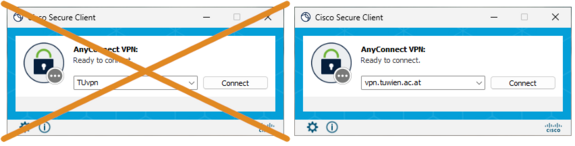
Due to a change at TUvpn, the name that needs to be entered when establishing a connection is changing.
The previous name TUvpn must be replaced with vpn.tuwien.ac.at; this will then allow you to establish a successful connection.
This change takes effect immediately.
To stop the Cisco Secure Client from "correcting" the new address into the old address, a settings file must be deleted.
This can be done as follows:
- On Windows: using the TUvpn-Profilekill tool from the TUtoolBox or manually by deleting the files %ProgramData%\Cisco\Cisco Secure Client\VPN\Profile\TUvpn.xml (system-wide, requires administrative privileges) and %LocalAppData%\Packages\CiscoSystems.AnyConnect_edjcgkw48dhxt\LocalState\Profile\TUvpn.xml (user-specific), if either or both exist.
- On macOS: by deleting the file /opt/cisco/secureclient/vpn/profile/TUvpn.xml with administrative privileges; a tool similar to TUvpn-Profilekill is in development.
- On Linux: by deleting the file /opt/cisco/secureclient/vpn/profile/TUvpn.xml with root privileges.
(A new such file will be created during the next connection attempt, but its contents will be different.)
We apologize for the inconvenience caused by this change!